01
Fast public link resolution
Paste a supported RedNote, Xiaohongshu, or xhslink URL and quickly see the source media exposed by the public post.
 RedNoteDownloader
Save public videos, photos, Live Photos, and image galleries directly from your browser. No account, app, or complicated steps required.
Unofficial service — not affiliated with RedNote or Xiaohongshu.
Paste the full share text from the app if that is easier.
RedNote Downloader is a free online tool for downloading videos and photos from public RedNote posts. RedNote is the international name of Xiaohongshu (小红书), also called Little Red Book or RedBook. Paste a post URL, a share link, or an xhslink.com / xhslink.cn short link, and the tool finds the source media the public post exposes: the video file, every photo in a gallery, Live Photo clips, the cover thumbnail, and the creator's profile picture.
Use it on your phone, tablet, or desktop without a RedNote login. Preview public post media before saving, and only download videos or images you own or have permission to use. Private, deleted, or restricted posts are not supported.

Using RedNote Downloader is simple. Copy a public post link, paste it into the tool, and choose the available video or image file you want to save.
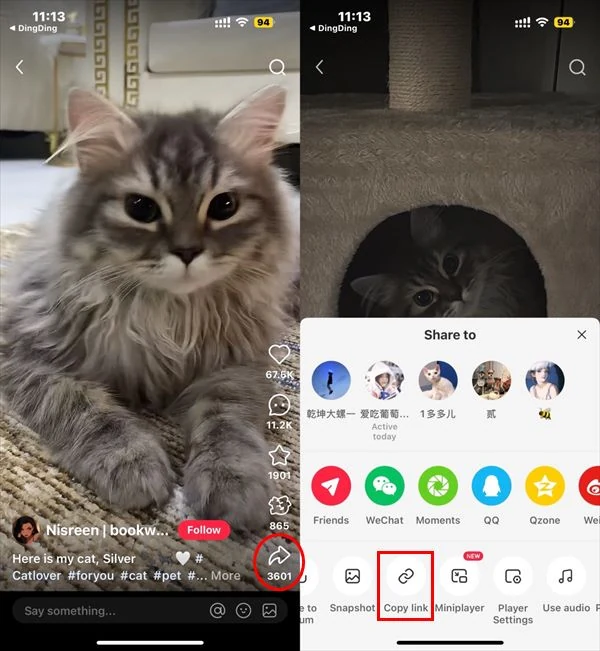
Open the public RedNote or Xiaohongshu post you want to download. Tap Share, then choose Copy link to copy the post URL.
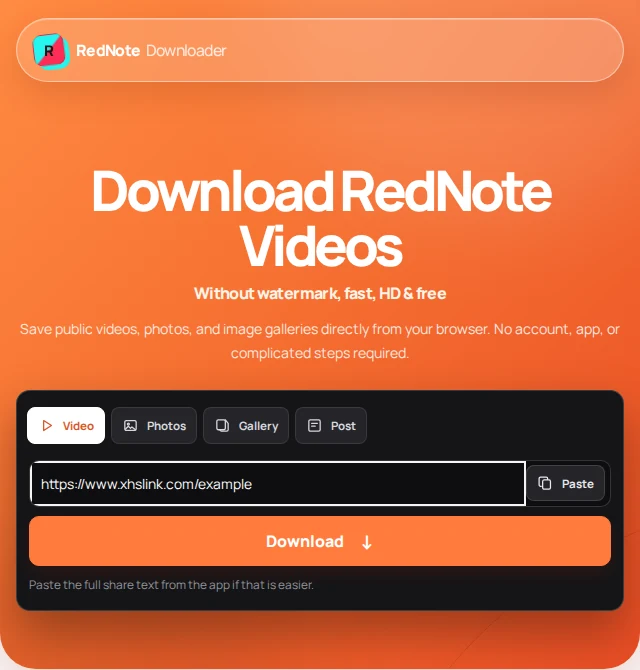
Return to this page and paste the RedNote URL, Xiaohongshu share link, or supported xhslink address into the downloader above.
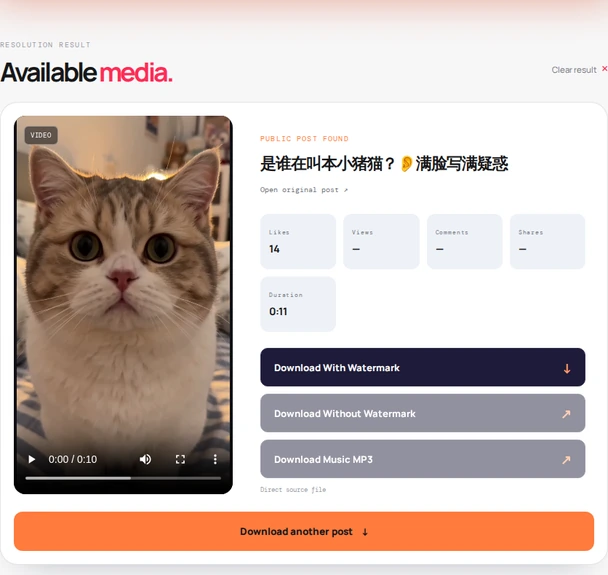
Review the available source media, then open the RedNote video, photo, or gallery file you have permission to use.
Built for public RedNote and Xiaohongshu posts, with a clear browser-first experience for videos, photos, and image galleries.
Paste a supported RedNote, Xiaohongshu, or xhslink URL and quickly see the source media exposed by the public post.
There is no account, RedNote password, app install, or complicated setup. Open the site, paste the link, and choose a file.
For videos you get the creator's original upload, which carries no RedNote logo, with the smaller HD stream as a second option. Photos come as the full-size originals behind the page, not the watermarked 1080px copies.
Resolve more than a single video: public posts can include photo galleries, Live Photo clips, cover thumbnails, and the creator's profile picture.
Use the same browser workflow on a phone, tablet, laptop, or desktop without installing another RedNote downloader app.
We do not ask for your login or intentionally store submitted links and media. Only use public content you own or have permission to save.
Use the same public-post workflow on iPhone, iPad, Android, Windows, Mac, Chromebook, and other modern browsers.
Every tool has trade-offs. Here is what this public-post downloader does well and where its limits matter.
Generic download sites often stop at a single video field. This tool is organized around the formats, links, and public-post limits RedNote users actually encounter.
Recognizes RedNote, Xiaohongshu, xhslink.com, and xhslink.cn share links instead of treating every URL like a generic video page.
Switch between video, photo, Live Photo, profile image, and video thumbnail tools from the same visual system.
Shows the public post preview and returns available source media links without asking you to build a personal media library.
No forced account, app installation, or maze of unrelated pages before you can inspect a supported public post.
Unavailable formats stay clearly marked instead of pretending that every post exposes every quality or transformation.
Designed to work with public content only and never positioned as a way to bypass privacy or login restrictions.
Public RedNote posts can contain more than a single video. Choose the tool that matches the content you want to inspect.
Resolve a public post and open the available source video in your browser.
Open video tool ↗ 02Save every photo from a public image post or multi-slide gallery as its own file.
Open photo tool ↗ 03Use a public creator page or post link to look for the available profile image.
Open profile tool ↗ 04Find the public cover or thumbnail exposed for a RedNote video post.
Open thumbnail tool ↗ 05Planned processor-backed audio extraction for supported public video sources.
See roadmap ↗ 06Save the short video clip and the still image behind a public RedNote Live Photo.
Open Live Photo tool ↗Quick answers about supported links, devices, privacy, formats, and public-post limits.
RedNote Downloader is a free, independent browser tool that saves videos, photos, Live Photos, and profile pictures from public RedNote and Xiaohongshu posts.
Yes. The browser tools are free for supported public post links. No account, RedNote login, or password is required.
Yes. The browser workflow works on iPhone, iPad, Android phones, Windows PCs, Macs, Chromebooks, and other modern browsers.
Yes. Open rednotedownload.com in any desktop browser on Windows, macOS, Chromebook, or Linux, paste the link, and save the file. If you want to browse RedNote itself on a PC, xiaohongshu.com works in a desktop browser.
Public links from RedNote, Xiaohongshu, xhslink.com, and xhslink.cn. You can also paste the complete share text from the app and the tool picks out the link.
No. Private, deleted, expired, login-gated, or region-restricted posts may not resolve.
Yes. Use the Photos tool for public photo posts and multi-image galleries. Every image in the post is listed as its own file, so you can save one slide or all of them.
Yes. Use the Live Photos tool with a public photo post that contains Live Photos. It returns the short video clip and the still image for each one, when the post exposes them.
Yes. The Profile image tool finds the public profile picture from a profile link or from a post link that includes the creator details.
Yes, for most posts. The first button downloads the creator's original upload, which has no RedNote logo (checked on real posts). The HD stream RedNote plays on its page carries a small logo, so it is offered second as a smaller file. Photos are served as the originals too, without the logo the page's resized copies carry. Text a creator burned into the media itself stays, because nothing is edited.
Only in the quality the creator uploaded. The first button is the original upload at that resolution; the HD stream RedNote plays is usually 1080p or 720p. 4K exists only when the post was uploaded in 4K. Nothing is upscaled or re-encoded.
No install is needed. The tool runs in the browser on any phone or computer, so there is no APK, desktop program, or Chrome extension to add.
The service does not intentionally store submitted links or downloaded media; it reads public post data and returns the source links. The site uses Google Analytics for anonymous usage statistics, as described in the privacy policy.
The post may be private, deleted, login-gated, or region-restricted, or the share link may have expired. Share links from the app expire after a while: open the post in RedNote again, tap Share, choose Copy link, and paste the fresh link.
Yes. After you paste a link, the result shows the post title, a media preview, and public likes, views, and comments before you download anything, so it also works as a simple RedNote post viewer.
No. RedNote Downloader is an independent utility and is not affiliated with, endorsed by, or sponsored by RedNote or Xiaohongshu.
RedNote Downloader is an independent tool. It is not affiliated with, endorsed by, or sponsored by RedNote or Xiaohongshu. Only download videos, photos, profile images, and other media that you own or have permission to use. Read our terms of use and privacy policy.
Last updated .