Paste a video post
A public RedNote or Xiaohongshu link, an xhslink short link, or the full share text.
 RedNoteDownloader
Find the cover image publicly exposed by a RedNote or Xiaohongshu video post and save it as an image file.
Unofficial service — not affiliated with RedNote or Xiaohongshu.
Paste a public video URL or the complete share message from the app.
Every RedNote video post has a cover: the still image shown in the feed and in search before the video plays. Creators either pick a frame or upload a designed cover with text. This RedNote thumbnail downloader reads the public post page and returns that cover as an image file, without installing anything and without an account. Need the video itself? Use the video downloader.
A public RedNote or Xiaohongshu link, an xhslink short link, or the full share text.
The result previews the exact cover the post uses so you can confirm it before saving.
One button, one file. Use it only for content you have permission to use.
A RedNote cover is not always the first frame. Creators can scrub to any moment or upload a separate designed image, and that is what the feed shows. The tool returns the cover file referenced by the public page, so what you save is what viewers see.
It is an image, not a frame grab, so there is no play-button overlay and no compression from screenshotting.
Most RedNote videos are vertical, so most covers are too; horizontal videos give horizontal covers.
A selected frame or an uploaded cover image with text, whichever the creator set. If they never changed it, it is usually the first frame.
The original cover file as a JPG, about 1080 × 1440 for a typical vertical video. Large enough for a feed, a preview card, or a moodboard.
The play icon and duration badge are drawn by the app, and the resized copy on the web page carries a small RedNote logo. The original cover file has none of them. Text the creator designed into the cover stays.
A photo post's "cover" is its first image. For the whole gallery, use the Photos tool.
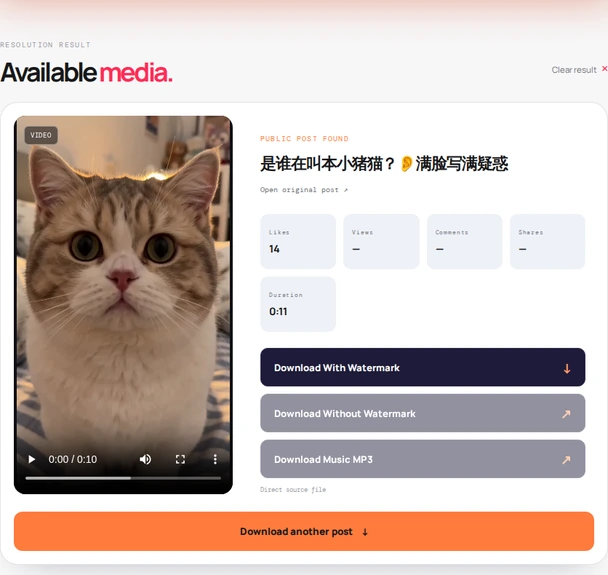
Three steps, the same as every tool on this site.
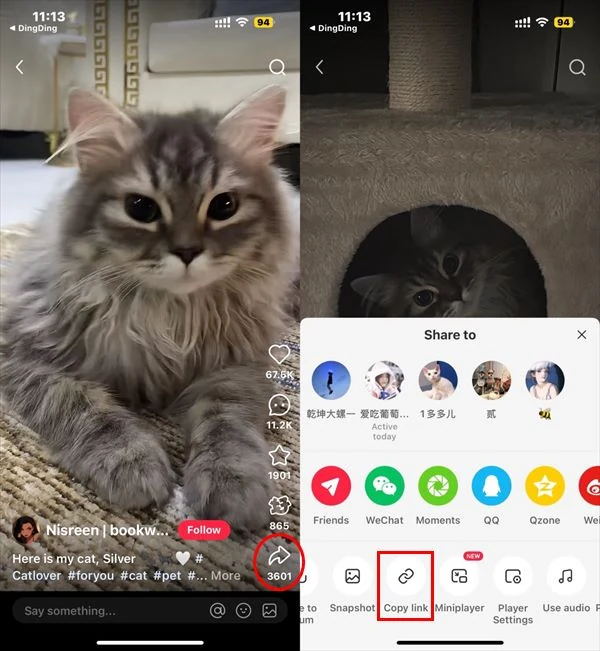
Open the public RedNote or Xiaohongshu video post, tap Share, then Copy link. On a computer, the address bar URL works as well.
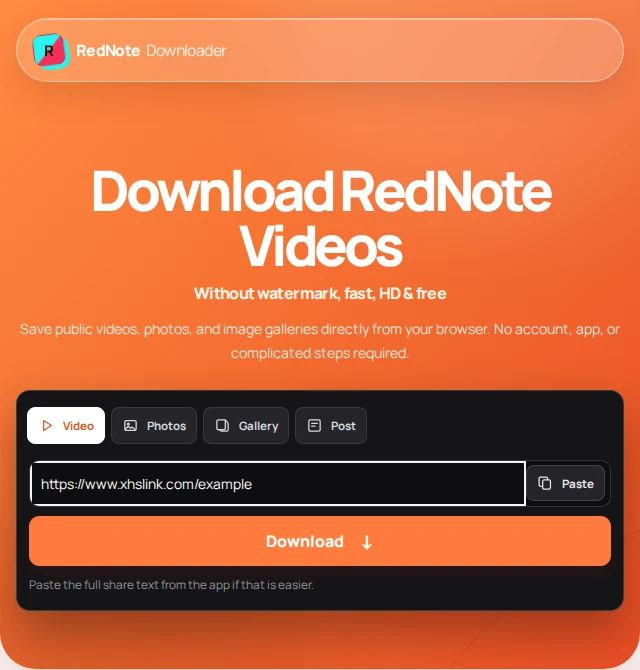
Paste the link or the whole share message into the field above and press Find thumbnail. The cover appears as the preview.
Press Download Video Thumbnail. If the image opens in a new tab instead of downloading, long-press it on a phone or right-click on a computer and save.
The tool returns the cover the public page references. It does not open or decode the video.
Covers are ordinary image files, so they save like any picture from the web. A few notes on using them afterwards.
Long-press the opened cover and pick Save to Photos. Because it keeps the video's 3:4 or 9:16 shape, it drops into a Story or Reel frame without cropping.
Chrome saves the file to Downloads; Google Photos and most gallery apps index it within seconds. If it opens instead, long-press → Download image.
Right-click → Save image as, then open the JPG in any editor to add your own text or resize it for a preview card.
Each tool reads the same public post page but returns a different part of it.
First frame or chosen frame, sizes, watermarks, and photo posts.
Not necessarily. RedNote lets creators pick a frame or upload a separate cover image, and the tool returns whichever cover the post actually uses. If the creator never changed it, that is usually the first frame.
No. The tool returns the cover image the post exposes; it does not decode the video or extract frames. To grab another moment, download the video with the video tool and take a frame in any player or editor.
The original cover file as a JPG, in the video's own aspect ratio, about 1080 by 1440 pixels for a typical vertical video. There is no play-button overlay or RedNote logo baked into the file.
No. This page is for the cover or thumbnail image only. Use the video tool on the homepage when you want the video file itself.
You get the post's cover, which for a photo post is its first slide. For every slide in a photo post, use the Photos tool instead.
No. The resized copy on RedNote's web page carries a small RedNote logo, but the tool requests the original cover file from RedNote's image servers, which has no logo or username overlay. Text or logos the creator designed into the cover itself stay, because nothing is edited.
The post may be private, deleted, restricted, or expired, the share link may have expired, or the page may not expose a cover image to visitors. Copy a fresh link from the app and try again.
No. RedNote Downloader is an independent utility and is not affiliated with, endorsed by, or sponsored by RedNote or Xiaohongshu.
A designed cover took someone time. Save your own, or a creator's with permission, and credit them if you reuse it. Read our terms of use and privacy policy.
Last updated .