Share the post URL
Paste a public photo post link, an xhslink short link, or the full share text copied from the app.
 RedNoteDownloader
Save every image from a public RedNote or Xiaohongshu photo post, one slide at a time or all at once, in the quality the post exposes.
Unofficial service — not affiliated with RedNote or Xiaohongshu.
Paste a public photo URL or the complete share message from the app.
This RedNote photo downloader works for public RedNote and Xiaohongshu image posts: single photos, multi-image slide galleries, selfies, screenshots, outfit and product shots. Paste the share link, preview the gallery, and save each image as a separate file in the quality the post page exposes. It is the same thing people search for as a Xiaohongshu photo downloader or RedNote image downloader, and it needs no account, app, or login.
Paste a public photo post link, an xhslink short link, or the full share text copied from the app.
The result lists each image the public post exposes, in the order the creator arranged them.
Open one slide or all of them, and use them only with the creator's permission.
When you paste a photo post, the tool reads the public post page once, finds the images it references, and requests the original file behind each one from RedNote's image servers. Nothing is screenshotted, cropped, or re-encoded on our side.
That has a few practical consequences, listed here so you know exactly what lands in your gallery.
RedNote photo posts hold up to 18 images. The result shows them all, numbered in the creator's order, each with its own download button.
Every slide arrives as a standard JPG that opens anywhere. Some creators upload HEIC; RedNote's image server converts those for you at 95% quality, so you never receive a file your device can't open.
RedNote's page shows a resized 1080-pixel copy of each slide. The tool requests the full-size original behind it instead, typically 1440 × 2400 or larger for a tall slide, and checks that it exists before showing the button.
The resized copy on the web page carries a small RedNote logo, and the app's Save button adds a username too. The original file has neither. Text or marks the creator designed into the image itself stay.
Captions, hashtags, and comments are not exported (post text export is on the roadmap). Live Photo clips have their own tool.
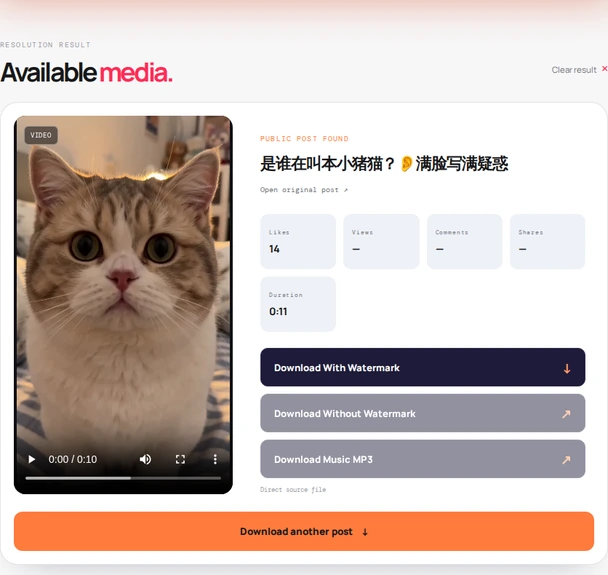
Three steps, about a minute. The screenshots show the same flow on a phone.
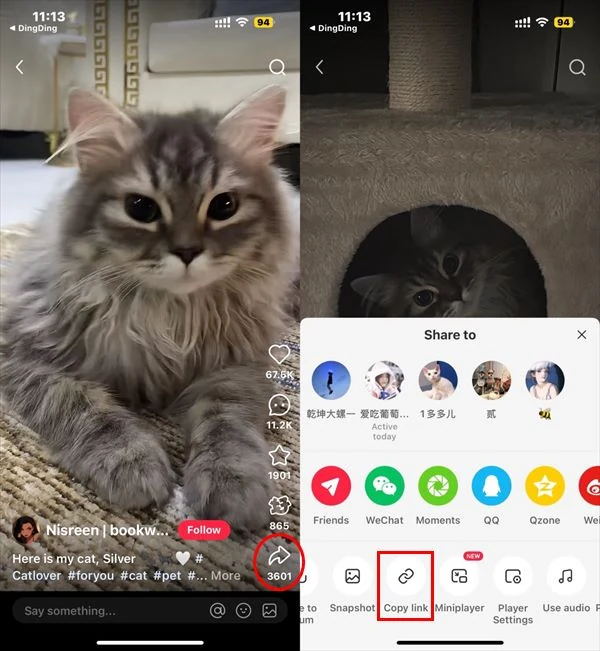
Open the public RedNote or Xiaohongshu photo post, tap Share, then Copy link. If the app copies a whole message with the link inside, that is fine too.
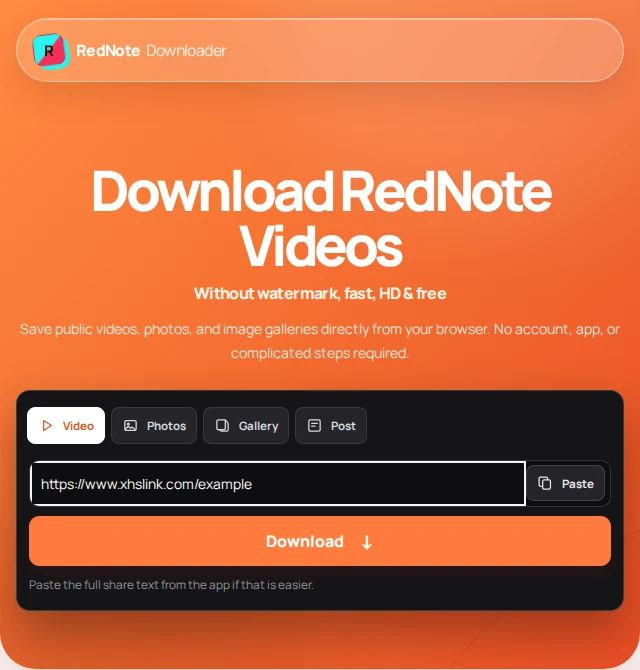
Return here, paste into the field above (the Paste button reads your clipboard), and press Find photos. The post title and the gallery appear in a moment.
Tap a slide's button. The image either downloads directly or opens in a new tab, depending on your browser; if it opens, long-press (phone) or right-click (computer) to save it.
The tool reads public pages only, so what it can return is exactly what RedNote shows a logged-out visitor.
The download buttons point straight at RedNote's content servers. Some browsers download the file immediately; others open it first. Both are normal.
If the image opens in a tab, long-press it and choose Save to Photos, or use the share icon → Save Image. It lands in Photos as a normal JPG.
Chrome usually downloads straight to your Downloads folder and the gallery picks it up. If the image opens instead, long-press → Download image.
Right-click the opened image → Save image as. The JPG opens in any viewer or editor with no conversion needed.
Each tool reads the same public post page but returns a different part of it.
Some slides carry a short motion clip. This tool returns the clip and the still for each one.
Open Live Photo tool ↗ 02For video posts, get the source video file in the quality the creator uploaded.
Open video tool ↗ 03Save the creator's public avatar from a post or profile link.
Open profile tool ↗Formats, sizes, watermarks, and why a gallery sometimes comes back short.
Yes. Every image the public post exposes is listed as its own file, in the creator's order, so you can save one slide or all of them. RedNote photo posts hold up to 18 images.
Yes. The resized copy shown on RedNote's web page carries a small RedNote logo, and the app's own Save button adds a username as well. The tool downloads the original file from RedNote's image servers, which has neither. Text or marks the creator designed into the image itself stay, because nothing is edited.
JPG, always. Most originals are JPG already; when a creator uploaded HEIC, RedNote's image server converts it to a full-size JPG at 95% quality before you download it, so every file opens on any phone or computer.
Yes, at the original resolution. The web page itself only shows a 1080-pixel-wide copy, but the tool requests the full-size original behind it, typically 1440 by 2400 pixels or larger for a tall slide, and verifies it exists before showing the button. If an original is ever unavailable, the button falls back to the page copy.
Yes. Each slide has its own download button, so pick only the image you want and leave the rest.
Yes. RedNote and Xiaohongshu are the same platform. Full xiaohongshu.com or rednote.com URLs, xhslink.com and xhslink.cn short links, and the complete share text from the app are all accepted.
The post may be private, restricted, deleted, or expired, or the share link may have expired. Open the post in the app again, copy a fresh link, and try once more. Video posts have no slides; use the video tool for those.
No. RedNote Downloader is an independent utility and is not affiliated with, endorsed by, or sponsored by RedNote or Xiaohongshu.
Photos belong to the people who took them. Save your own posts, content you have permission to use, or references for personal use, and credit creators when you share. Read our terms of use and privacy policy.
Last updated .