Paste the post link
Use a public photo post that contains Live Photos, or the full share text from the app.
 RedNoteDownloader
Save the short motion clip and the still image behind a public RedNote or Xiaohongshu Live Photo, both as separate files.
Unofficial service — not affiliated with RedNote or Xiaohongshu.
Paste a public photo post URL or the complete share message from the app.
A RedNote Live Photo is a slide in a photo post that carries a short video clip alongside the still image, the same idea as an iPhone Live Photo. In the app it plays when you press and hold. The public post page exposes both files, and this Live Photo downloader returns both: the clip as a video you can play anywhere, and the still as a normal image. It works for RedNote and Xiaohongshu posts alike, with no account or login.
Use a public photo post that contains Live Photos, or the full share text from the app.
The first Live Photo clip plays in the result so you can confirm it is the right post.
Each Live Photo gets two buttons: one for the video clip, one for the still image.
On RedNote's page, a Live Photo is stored as two separate things: the still image the gallery shows, and a short video stream that plays on press-and-hold. The tool pairs them for you and gives each its own button, in the slide order of the post.
Because they are two files, you can keep just the clip for a video edit, just the still for a wallpaper, or both.
Nothing is converted. What you save is what RedNote's servers deliver to the page.
About three seconds, 1080 × 1440 on the posts we tested. RedNote exposes only its stream version of Live Photo clips (there is no separate original), so like other RedNote streams the clip may carry the small RedNote logo. It plays in any video player and can be trimmed, looped, or turned into a GIF.
The same original-size, logo-free JPG the Photos tool returns, which opens on any phone or computer.
iPhones store Live Photos as a paired HEIC + MOV. RedNote does not expose that pairing, so to get a press-and-hold Live Photo back on an iPhone you need a converter app that joins the two files.
Ordinary photos in the same post are skipped here. Run the link through the Photos tool for those.
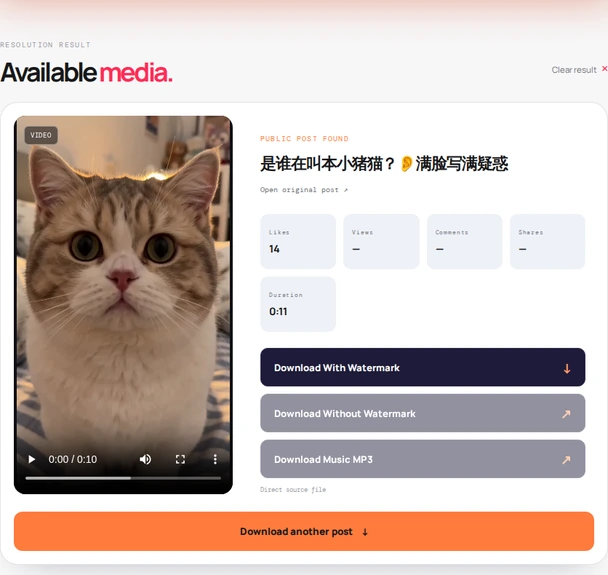
The same three steps as every tool on this site; only the button labels differ.
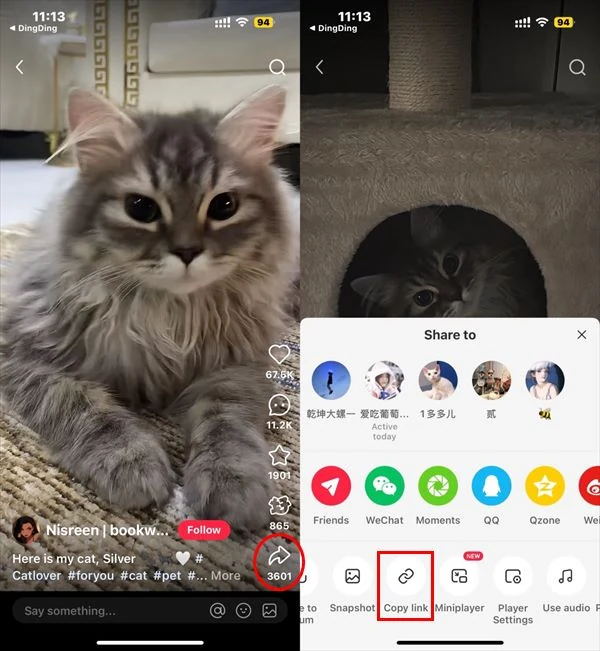
Open the public post that contains the Live Photo (you can tell by the small Live badge or by press-and-hold in the app), tap Share, then Copy link.
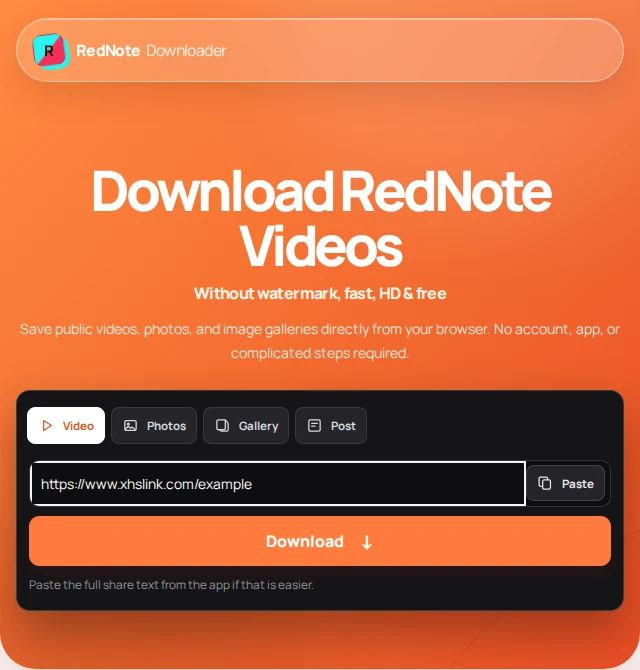
Paste the link or the whole share message into the field above and press Find Live Photos. The post title, public stats, and the first clip appear.
Tap Download Live Photo 1 (video) for the clip and Download Still 1 for the image. If a file opens in a new tab instead of downloading, long-press or right-click it to save.
Live Photo support depends entirely on whether the public post page carries the clip. When it does, you get it; when it doesn't, nothing can recreate it.
The clip is a plain MP4, so it behaves like any downloaded video. The differences are in how each system treats the "Live" part.
The clip lands in Photos as a short video, the still as an image. To merge them into a press-and-hold Live Photo, use a converter app from the App Store; iOS cannot do it alone.
Chrome downloads the MP4 to your Downloads folder and the gallery shows it as a video. Some gallery apps can set a short clip as a motion wallpaper.
Open the MP4 in your default player, or drop it into an editor to loop, trim, or export a GIF. If the clip opens in a tab, right-click → Save video as.
Each tool reads the same public post page but returns a different part of it.
What the files are, what they are not, and what to do when a slide comes back as a plain photo.
A RedNote Live Photo is a slide in a photo post that carries a short video clip alongside the still image, like an iPhone Live Photo. In the app it plays when you press and hold the image. The post page exposes both files, and this tool returns both.
Yes. Each Live Photo in the post gets a video download button for the clip and a second button for the still image. The clip is a regular MP4 video you can play, share, or edit anywhere.
Not automatically. You receive two separate files, an MP4 clip and a still image, which is how RedNote's page exposes them. To combine them back into an iPhone Live Photo you need a third-party converter app from the App Store. On Android the clip plays as a normal video.
Not here, but easily elsewhere. Save the MP4 clip first, then use any video-to-GIF converter or your phone's built-in tools. The tool itself never converts or re-encodes files.
The post did not expose a motion clip for that slide, so only the still image is available. Not every photo in a post is a Live Photo, and some posts strip the clip. Use the Photos tool for ordinary images.
This tool lists only the slides that carry a clip. For the remaining ordinary slides, run the same link through the Photos tool, which lists every image in the post.
Yes. RedNote and Xiaohongshu are the same platform, so public post links from either, including xhslink.com and xhslink.cn share links, are supported.
No. RedNote Downloader is an independent utility and is not affiliated with, endorsed by, or sponsored by RedNote or Xiaohongshu.
Live Photos are personal moments. Save your own, or clips you have permission to use, and credit the creator if you share them on. Read our terms of use and privacy policy.
Last updated .